Thursday, 19 September 2019

D365FO - Importing License File (ISV/VAR Add-on) via deployable package (LCS)

In order to deploy this license file to, we need to do the following. 

It is a two-step process 

1. Copy license file to ImportISLicense.Zip folder 
Any AOS server:

Windows Explorer > \AOSService\PackagesLocalDirectory\Bin\CustomDeployablePackage
*usually C:\AOSService\PackagesLocalDirectory\Bin\CustomDeployablePackage or on the K-drive*
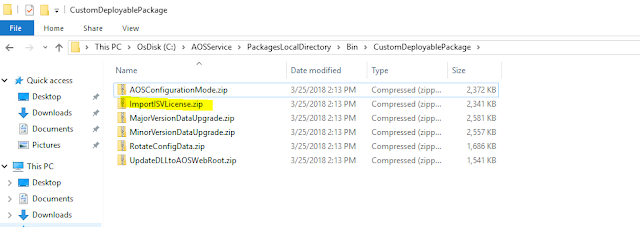


In here you will find the file  ImportISVLicense.zip

Make a copy of this zip file and open it up (don't unzip, just open it). 
Then browse to the following location: ImportISVLicense.zip\AosService\Scripts\License
Copy the license .txt file into this folder and save the zip.


2. Upload to LCS packages 

LCS > Open the AX project in which you wish to apply the license to which in this case is the QA environment which means we need to open the implementation project. Then go to Asset library
Go to software deployable package > Click on the add button and fill out the info regarding the file being uploaded and select the zip file we created in the steps above


wait for a couple of minutes before the "valid" box has a checkmark. You will not be able to apply this file until the instance is marked as valid.

Once the instance has been marked as valid we need to apply it to the system.

Go to the full details page for the specific environment we need to apply this to and click on the Maintain option > Apply updates

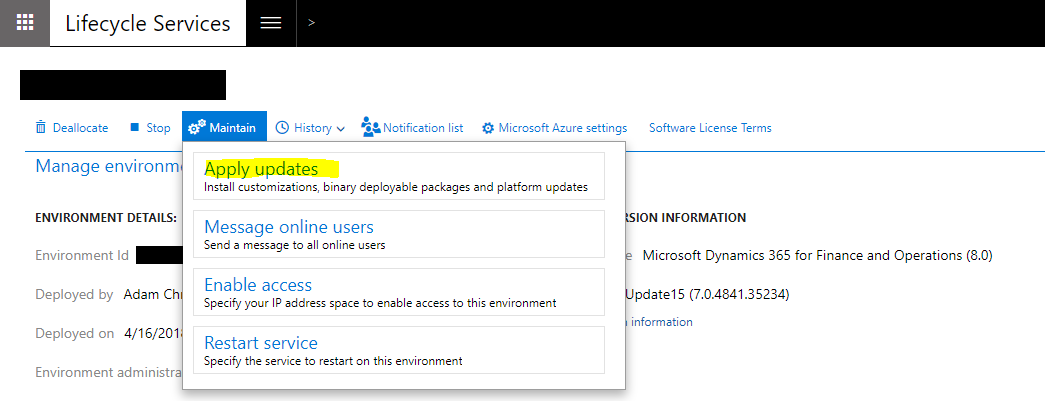
apply+updates+menu.png (1045×401)
From this window, we need to choose the asset we just created and click on apply

After this, the system will process the request and trigger emails whenever the process starts and completes.

Whenever you open the main page you will also see the current status of the import itself as well.

Reference:

Friday, 13 September 2019

D365 F&O X++ code to copy data form one table two other table with similar fields using SysdictTable

Today we will see a code, which is useful to copy data from one table to a similar table and let's say you have many fields.


public static Common copyFromToTable(Common _commonFrom, Common _commonTo)
    {
        SysDictTable    dictTable = new SysDictTable(_commonTo.TableId);
        SysDictField    dictField;
        FieldId         fieldId = dictTable.fieldNext(0);
       
        while (fieldId)
        {
            dictField = dictTable.fieldObject(fieldId);

            if (dictField.isSql() && !dictField.isSystem())
            {
                FieldName fieldName = dictField.name();
                FieldId fieldIdFrom = fieldName2Id(_commonFrom.TableId, fieldName);

                if (fieldIdFrom)
                {
                    _commonTo.(dictField.id()) = _commonFrom.(fieldIdFrom);
                }
            }

            fieldId = dictTable.fieldNext(fieldId);
        }

        return _commonTo;
    }

Monday, 13 May 2019

D365 Disable grid field based on other field value

Disable grid field based on other field value in D365 FO


Here we will see how we can disable field in the grid based on the other field value.
1. Create a call extension for the form
2. Goto From the data source and in events copay active event
3. come to class you created in step one and past it.
4. Below is the sample code. 

[ExtensionOf(formStr(FormParameters))]
final class ParametersFormUP_Extension
{
   
    ///
    /// for UsagePrice the Group should must be disabled
    ///
    ///
    ///
    [FormDataSourceEventHandler(formDataSourceStr(FormParameters,FormDatasource), FormDataSourceEventType::Activated)]
    public static void FormDatasource_OnActivated(FormDataSource sender, FormDataSourceEventArgs e)
    {
        FormDataSource              fds = sender.formRun().dataSource(formDataSourceStr(FormParameters,FormDatasource));
        FormDatasourceTable       dsTable = fds.cursor();
        FormRun                     fr = sender.formRun();
        //FormControl                 fc = fr.design(0).controlName("FINMeters_FINRollover");
        //FormControl                 fcMeterType = fr.design(0).controlName("FINMeters_FINMeterType");

        //fc.enabled(meterTable.FINMeterType == FINMeterType::Continuous);
       
        fds.object(fieldNum(FormDatasourceTable ,fieldForGroup)).allowEdit(!(dsTable.AgreementType == AgreementType::UsagePricing));

    }

}

Thursday, 18 April 2019

Cross reference alternative D365 FO

FindStr


Today we are going to look interesting stuff, which can be very handy for the developers. This is nothing but, FindStr windows command, which searches for the patterns of text in files.


As everyone is aware of the thing that, in D365FO all the objects i.e. Tables, forms, classes, etc are stored as files (XML's). So it makes sense that, we use can use the Windows command to find the files. 

Now we will see how we can use the FindStr command. 

1. Open command prompt (as administrator)
2. Change to Package directory (CD ) Ex: C: cd K:\AosService\PackagesLocalDirectory\XXXModel\XXXModel
3.  FindStr /S /L /I  /C:"serachText"*.xml

it will give you the result similar to cross-reference 

Sunday, 3 March 2019

Form Lookup Event Handler D365FO

Here we are going to see how we can filter / override the lookup on the form control.

Scenario, we need to override the TemplateID lookup based on the ProjGroupId field.

1. First we need to copy the OnLookup event on the form field control.


2. Create a new class and past the above event
 ///
    ///
    ///
    ///
    ///
    [FormControlEventHandler(formControlStr(MkQuoteCreate, TemplateId), FormControlEventType::Lookup)]
    public static void TemplateId_OnLookup(FormControl sender, FormControlEventArgs e)
    {
//
    }
 
3. Now the actual lookup code.

 FormRun                     callerFormRun;
        MKQuotations          quotations;
//Get the Data source of the form
        quotations = sender.dataSourceObject().cursor();
        Query                       query = new Query();
        QueryBuildDataSource        queryBuildDataSource;
        QueryBuildRange             queryBuildRange;
        SysTableLookup              sysTableLookup = SysTableLookup::newParameters(tableNum(MKTemplateTable), sender);
        sysTableLookup.addLookupField(fieldNum(MKTemplateTable, TemplateId));
        sysTableLookup.addLookupField(fieldNum(MKTemplateTable, Description));
        queryBuildDataSource = query.addDataSource(tableNum(MKTemplateTable));
        queryBuildRange = queryBuildDataSource.addRange(fieldNum(MKTemplateTable, ProjGroupId));
        queryBuildRange.value(quotations.ProjGroupId);
        sysTableLookup.parmQuery(query);
        sysTableLookup.performFormLookup();

 FormControlCancelableSuperEventArgs ce = e as FormControlCancelableSuperEventArgs;
        //cancel super() to prevent error.
        if (ce)
        {
            ce.CancelSuperCall();
        }


A few things we can note here are...
1. To get the Datasource cursor we need to use the "sender" parameter as below.

quotations= sender.dataSourceObject().cursor();
Eg:
 ecoResProduct   = sender.formRun().dataSource(formDataSourceStr(EcoResProductDetailsExtended, EcoResProduct)).cursor();


Tuesday, 11 December 2018

Message: Duplicate type with name 'Dynamics.Ax.Application.XXXX' in assembly 'Dynamics.Ax.Application, Version=6.3.5000.138, Culture=neutral, PublicKeyToken=null'.

Scenario: 

Trying to deploy Inbound custom service using HTTP adapter.

Issue:

IIS Application pool stops automatically and not stay in start mode.

Below is the event viewer 

There was an error during processing of the managed application service auto-start for configuration path: 'MACHINE/WEBROOT/APPHOST/Default Web Site/MicrosoftDynamicsAXAif60'. The error message returned is: 'An initialization error occurred while trying to preload an application.

Exception: System.Configuration.ConfigurationErrorsException

Message: Duplicate type with name 'Dynamics.Ax.Application.xxxxxxx' in assembly 'Dynamics.Ax.Application, Version=6.3.5000.138, Culture=neutral, PublicKeyToken=null'.

StackTrace:    at System.Web.Configuration.CompilationSection.LoadAssemblyHelper(String assemblyName, Boolean starDirective)
   at System.Web.Configuration.CompilationSection.LoadAllAssembliesFromAppDomainBinDirectory()
   at System.Web.Configuration.CompilationSection.LoadAssembly(AssemblyInfo ai)
   at System.Web.Compilation.BuildManager.GetReferencedAssemblies(CompilationSection compConfig)
   at System.Web.Compilation.BuildManager.GetPreStartInitMethodsFromReferencedAssemblies()
   at System.Web.Compilation.BuildManager.CallPreStartInitMethods(String preStartInitListPath, Boolean& isRefAssemblyLoaded)
   at System.Web.Compilation.BuildManager.ExecutePreAppStart()
   at System.Web.Hosting.HostingEnvironment.Initialize(ApplicationManager appManager, IApplicationHost appHost, IConfigMapPathFactory configMapPathFactory, HostingEnvironmentParameters hostingParameters, PolicyLevel policyLevel, Exception appDomainCreationException)

InnerException: System.BadImageFormatException

Message: Duplicate type with name 'Dynamics.Ax.Application.AMS_ItemImportContract' in assembly 'Dynamics.Ax.Application, Version=6.3.5000.138, Culture=neutral, PublicKeyToken=null'.

StackTrace:    at System.Reflection.RuntimeAssembly._nLoad(AssemblyName fileName, String codeBase, Evidence assemblySecurity, RuntimeAssembly locationHint, StackCrawlMark& stackMark, IntPtr pPrivHostBinder, Boolean throwOnFileNotFound, Boolean forIntrospection, Boolean suppressSecurityChecks)
   at System.Reflection.RuntimeAssembly.InternalLoadAssemblyName(AssemblyName assemblyRef, Evidence assemblySecurity, RuntimeAssembly reqAssembly, StackCrawlMark& stackMark, IntPtr pPrivHostBinder, Boolean throwOnFileNotFound, Boolean forIntrospection, Boolean suppressSecurityChecks)
   at System.Reflection.RuntimeAssembly.InternalLoad(String assemblyString, Evidence assemblySecurity, StackCrawlMark& stackMark, IntPtr pPrivHostBinder, Boolean forIntrospection)
   at System.Reflection.RuntimeAssembly.InternalLoad(String assemblyString, Evidence assemblySecurity, StackCrawlMark& stackMark, Boolean forIntrospection)
   at System.Reflection.Assembly.Load(String assemblyString)
   at System.Web.Configuration.CompilationSection.LoadAssemblyHelper(String assemblyName, Boolean starDirective)'.  The worker process will be marked unhealthy and be shutdown.  The data field contains the error code.


Solution: 

This solution worked for me, but I'm not sure if it works for every one.

1. Goto IIS Manager
2. Click on application pools
3. Select MicosoftDynamicsAXAif60
4. Right click  and select Basic Settings.
5. In the Edit application pool form select .NET CLR version
6. From the drop-down select V2.0xxxx
7. Now start the Application pool.
8. Now goto AX and try to deploy the AIF service.
9. Now change the .NET CLR version back to V4.0xxxx

It has worked for me and hope will work for you also, let me know in the comments.

Hope this will solve the issue.


Thursday, 6 December 2018

Item Service in AX 2012- This document does not support the AxEcoResProductIdentifier class or AxEcoResProductCategory class

Item Service in AX 2012- This document does not support the AxEcoResProductIdentifier class or AxEcoResProductCategory class


This is just my reference, thanks to original post 

In AX 2012's Item service as part of creating an Item/Product through AIF Service if you try to populate entities EcoResProductIdentifier, EcoResProductCategory you may receive these errors: 

This document does not support the AxEcoResProductIdentifier class 
or 
This document does not support the AxEcoResProductCategory class 

You may very well receive these errors after going through the AIF wizard and regenerating the Item Service (InventTable and EcoResProduct), the reason being wizard doesn't generate some code related to all the Tables involved in the AxdQuery.

To fix this, I had to add following code in class -> AxdEcoResProduct-> prepareForSave()

       case classNum(AXEcoResProductIdentifier):
            axecoResProductIdentifier   = _axdStack.top() as AxEcoResProductIdentifier;
            axEcoResProduct             = axecoResProductIdentifier.parentAxBC() as AxEcoResProduct;
            axecoResProductIdentifier.parmProduct(axEcoResProduct.parmRecId());
            return true;       
        
        case classNum(AxEcoResProductCategory):
            axEcoResProductCategory     = _axdStack.top() as AxEcoResProductCategory;
            axEcoResProduct             = axEcoResProductCategory.parentAxBC() as AxEcoResProduct;
            axEcoResProductCategory.parmProduct(axEcoResProduct.parmRecId());
            return true;   

How to Get Trade Agreement Line Discount Percentage by Item and Date in D365FO Using X++

  In Microsoft Dynamics 365 Finance and Operations (D365FO), trade agreements are used to manage prices and discounts for customers, vendor...