Tuesday, 18 January 2022

FormDataSourceEventHandler to enable field

 class IPLVendTableTriggerForm_EventHandler

{

    /// <summary>

    ///

    /// </summary>

    /// <param name="sender"></param>

    /// <param name="e"></param>

    [FormDataSourceEventHandler(formDataSourceStr(VendTable, VendTable), FormDataSourceEventType::Activated)]

    public static void VendTable_OnActivated(FormDataSource sender, FormDataSourceEventArgs e)

    {

        VendTable       vendTable = sender.cursor();

        FormDataSource  vendTable_ds = sender.formRun().dataSource("VendTable");

        FormRun         element = sender.formRun();

        FormControl     processTo = element.design(0).controlName("BISTrigger_ProcessTo");


        if(vendTable.ProcessTo == NoYes::Yes)

        {

            processTo.enabled(false);

        }

        else

        {

            processTo.enabled(true);

        }

    }


}

Thursday, 15 April 2021

Find Missing Indexes SQL query

 USE YourDatabase

GO


SELECT db.[name] AS [DatabaseName]

    ,id.[object_id] AS [ObjectID]

,OBJECT_NAME(id.[object_id], db.[database_id]) AS [ObjectName]

    ,id.[statement] AS [FullyQualifiedObjectName]

    ,id.[equality_columns] AS [EqualityColumns]

    ,id.[inequality_columns] AS [InEqualityColumns]

    ,id.[included_columns] AS [IncludedColumns]

    ,gs.[unique_compiles] AS [UniqueCompiles]

    ,gs.[user_seeks] AS [UserSeeks]

    ,gs.[user_scans] AS [UserScans]

    ,gs.[last_user_seek] AS [LastUserSeekTime]

    ,gs.[last_user_scan] AS [LastUserScanTime]

    ,gs.[avg_total_user_cost] AS [AvgTotalUserCost]  -- Average cost of the user queries that could be reduced by the index in the group.

    ,gs.[avg_user_impact] AS [AvgUserImpact]  -- The value means that the query cost would on average drop by this percentage if this missing index group was implemented.

    ,gs.[system_seeks] AS [SystemSeeks]

    ,gs.[system_scans] AS [SystemScans]

    ,gs.[last_system_seek] AS [LastSystemSeekTime]

    ,gs.[last_system_scan] AS [LastSystemScanTime]

    ,gs.[avg_total_system_cost] AS [AvgTotalSystemCost]

    ,gs.[avg_system_impact] AS [AvgSystemImpact]  -- Average percentage benefit that system queries could experience if this missing index group was implemented.

    ,gs.[user_seeks] * gs.[avg_total_user_cost] * (gs.[avg_user_impact] * 0.01) AS [IndexAdvantage]

    ,'CREATE INDEX [IX_' + OBJECT_NAME(id.[object_id], db.[database_id]) + '_' + REPLACE(REPLACE(REPLACE(ISNULL(id.[equality_columns], ''), ', ', '_'), '[', ''), ']', '') + CASE

        WHEN id.[equality_columns] IS NOT NULL

            AND id.[inequality_columns] IS NOT NULL

            THEN '_'

        ELSE ''

        END + REPLACE(REPLACE(REPLACE(ISNULL(id.[inequality_columns], ''), ', ', '_'), '[', ''), ']', '') + '_' + LEFT(CAST(NEWID() AS [nvarchar](64)), 5) + ']' + ' ON ' + id.[statement] + ' (' + ISNULL(id.[equality_columns], '') + CASE

        WHEN id.[equality_columns] IS NOT NULL

            AND id.[inequality_columns] IS NOT NULL

            THEN ','

        ELSE ''

        END + ISNULL(id.[inequality_columns], '') + ')' + ISNULL(' INCLUDE (' + id.[included_columns] + ')', '') AS [ProposedIndex]

    ,CAST(CURRENT_TIMESTAMP AS [smalldatetime]) AS [CollectionDate]

FROM [sys].[dm_db_missing_index_group_stats] gs WITH (NOLOCK)

INNER JOIN [sys].[dm_db_missing_index_groups] ig WITH (NOLOCK) ON gs.[group_handle] = ig.[index_group_handle]

INNER JOIN [sys].[dm_db_missing_index_details] id WITH (NOLOCK) ON ig.[index_handle] = id.[index_handle]

INNER JOIN [sys].[databases] db WITH (NOLOCK) ON db.[database_id] = id.[database_id]

WHERE  db.[database_id] = DB_ID()

--AND OBJECT_NAME(id.[object_id], db.[database_id]) = 'YourTableName'

ORDER BY ObjectName, [IndexAdvantage] DESC

OPTION (RECOMPILE);

Friday, 12 March 2021

Add financial dimensions as separate columns to Data Entity.

 This is just for my reference: 


Add dimensions to Excel templates - Finance & Operations | Dynamics 365 | Microsoft Docs

AX 7. How to add financial dimensions as separate columns to Data Entity. - Dynamics 365 Finance Community


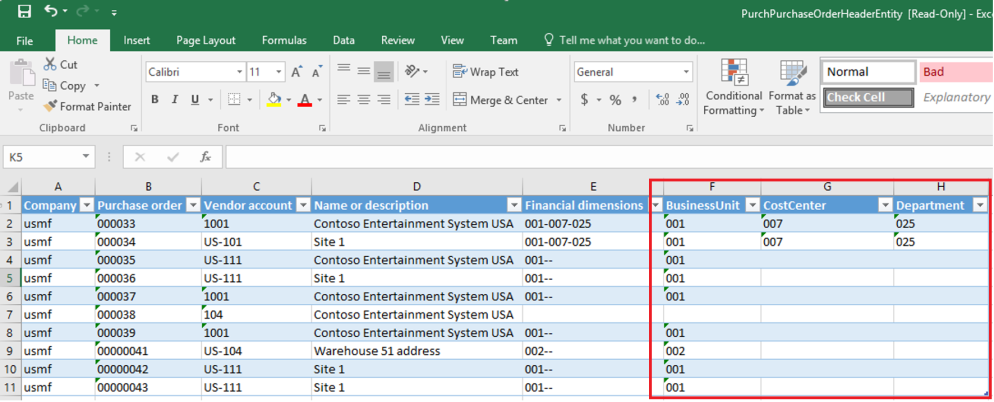
Everyone who is working with financial dimensions in AX would like to see them in separate columns in Excel and today we will look at how to achieve this for all Data Entities.

Image

It’s also awesome because we have a wizard that will do all the job for us!

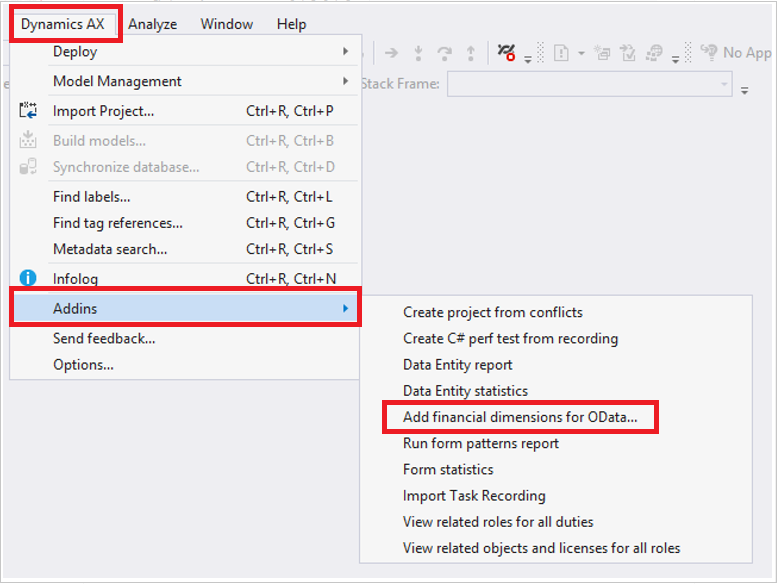
In the Visual Studio under Dynamics AX > Addins select “Add financial dimensions for OData…”

Image

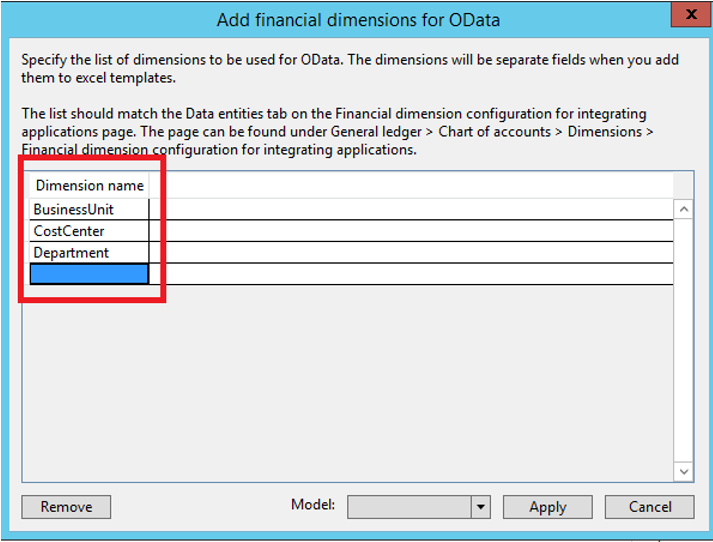
Now we need to enter the dimensions we want to expose. As you can see from a help text these dimensions should be set up in AX on the Data Entities tab under General ledger > Chart of accounts > Dimensions > Financial dimension configuration for integrating applications.

Image

Also, we need to specify a model for new objects. Please note that the model should have reference to the Dimensions model, however you can add reference afterward.

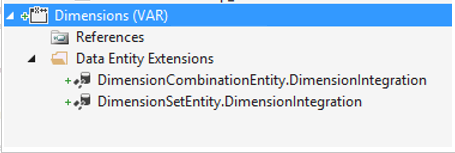
After clicking “Apply”, VS will show a new project creation dialog. A new project will be created. It will contain two Data Entity Extensions:

Image

Please note that you cannot rename them because internal code works only with entity extensions that have name = Data Entity Name + “DimensionIntegration”.

Both entities have identical changes, the only difference is that one shows default dimensions and another one ledger dimensions.

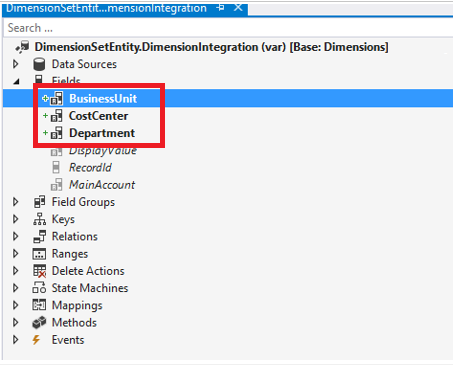
Let’s looks at DimensionSetEntity extension:

Image

It has 3 new fields, one for each financial dimension we specified in the wizard.

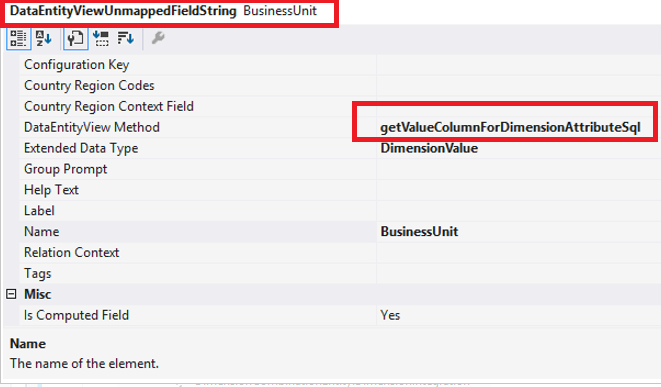
These fields are computed columns, each of them uses the same data method “getValueColumnForDimensionAttributeSql”.

Image

It is quite interesting and has some smarties inside but hardcoded values as well.

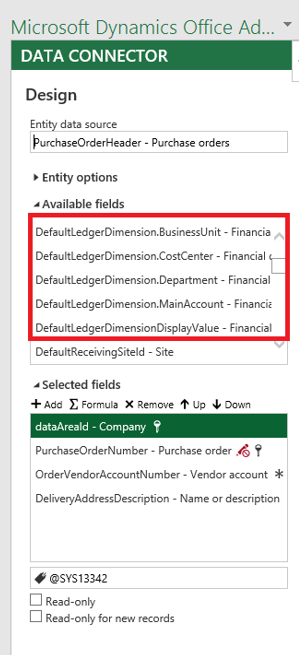
That all we need to do. After compilation and synchronization, we can open Data Entity in Excel and will see new fields in the data connector designer.

Image

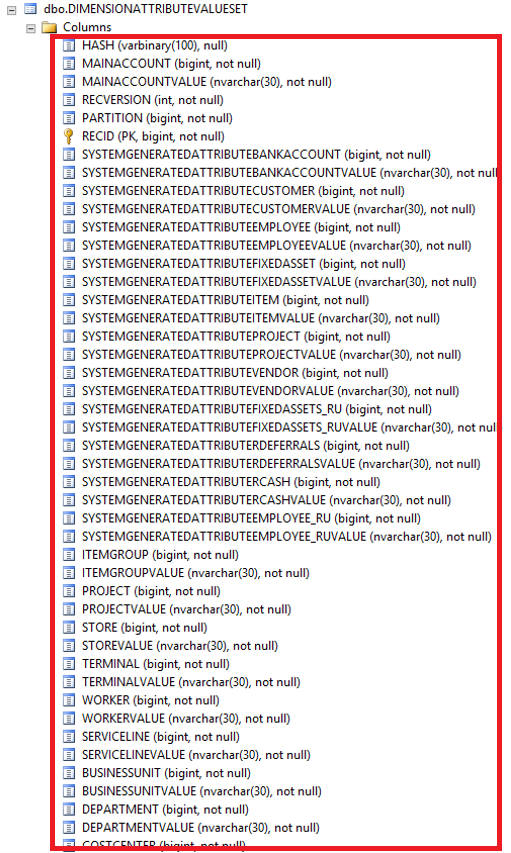
How does it work? That the most exciting part. All the magic is inside the DimensionAttributeValueSet table. If we look at it in AOT – nothing is really changed since AX 2012, but if we go to SQL management studio we will see a bunch of new columns:

Image

For each financial dimensions we have 2 columns: one contains the value and another RecId.

Each computed column in Dimensions entity select value from this table.

So, if you are doing BI with 3rd party tools, now you can use  DimensionAttributeValueSet and DimensionAttributeValueCombination tables to query all financial dimensions directly.


Monday, 13 July 2020

Change Batch status X++ code

static void MKChangeBatchStatus(Args _args)
{
    batchJob    batchJob;
   
    while select forupdate batchJob
       where batchJob.Status  == BatchStatus::Waiting
   {
       ttsBegin;
       batchJob.Status = BatchStatus::Hold;
       batchJob.update();
     
       ttsCommit;
   }
   
}

Wednesday, 8 July 2020

Get default financial dimension values through X++ code

In the below example we will see how we can get the default financial dimension values from Purch line table.
Here we are using AxdDimensionUtil helper class to get the Dimension values.

Note:  we can replace PurchLine table with any table with DefaultDimension field.

static void Job5(Args _args)
{
    PurchLine   purchLine;
    Counter     i;
    container   conDim;
    //
    purchLine = PurchLine::find("WP00097201",1);   
    conDim = AxdDimensionUtil::getDimensionAttributeValueSetValue(purchLine.DefaultDimension);

    for (i=1 ; i<= conLen(conDim) ; i++)
    {
         info(conPeek(conDim,i));
    }
}

There are other ways to find default Dimensions values. The one above is one of them.

The same result can also be achieved using "DimensionAttributeValueSetStorage" class.


public DimensionValue getDimValue(int _index, DimensionDefault _defaultDim)
    {
       // #DocumationGL // List that matches the GL Export
       container       dimAttrList     = ['BPCTrialBalance', 'Customer', 'Department', 'Employee', 'IntercompanyCode', 'Project','ServiceCategory'];
        Name            dimAttribName   = conPeek(dimAttrList, _index);

        DimensionAttributeValueSet          DimensionAttributeValueSet;
        DimensionAttributeValueSetItem      DimensionAttributeValueSetItem;
        DimensionAttributeValue             DimensionAttributeValue;
        DimensionAttribute                  DimensionAttribute;
        ;

        select RecId from DimensionAttributeValueSet
            where DimensionAttributeValueSet.RecId == _defaultDim

        join DisplayValue from DimensionAttributeValueSetItem
            where DimensionAttributeValueSetItem.DimensionAttributeValueSet == DimensionAttributeValueSet.RecId

        join RecId from DimensionAttributeValue
            where DimensionAttributeValue.RecId == DimensionAttributeValueSetItem.DimensionAttributeValue

        join RecId from DimensionAttribute
            where DimensionAttribute.RecId == DimensionAttributeValue.DimensionAttribute
               && DimensionAttribute.Name == dimAttribName;

        return DimensionAttributeValueSetItem.DisplayValue;
    }

    display DimensionValue dimTrialBalance(ProjPostTransViewGL  _projPostTransView)
    {
        ProjJournalTrans    projJournalTrans;
        ProjCostTrans       projCostTrans;
        container   conDim;
        switch (_projPostTransView.ProjTransType)
        {
            case ProjTransType::Item:
            case ProjTransType::Hour:
            case ProjTransType::Revenue:
            case ProjTransType::OnAccount:
                select  DefaultDimension
                from    projJournalTrans
                where   projJournalTrans.TransId == _projPostTransView.TransId;
                
                return  this.getDimValue(1,projJournalTrans.DefaultDimension);

            case ProjTransType::Cost:
                select  DefaultDimension
                from    projCostTrans
                where   projCostTrans.TransId == _projPostTransView.TransId;

                return  this.getDimValue(1,projCostTrans.DefaultDimension);

            default :
                return '';
        }
    }

Saturday, 13 June 2020

Find and Update the Default Dimension in AX 2012 R3 Using X++ Code

In this we are going to see how to find  or update default dimension value for an Item/Customer/Vendor.

Find Default Dimension value :

Display DimensionValue MKDim_Product()
{
    DimensionAttributeValueSetStorage   dimStorage;
    DimensionValue                      product;
    Counter                             i;
    #define.Product("Product")
//Note This in the below line can be replaced with InventTable /CustTable /VendTable
    dimStorage = DimensionAttributeValueSetStorage::find(this.DefaultDimension);

    for (i= 1 ; i<= dimStorage.elements() ; i++)
    {
        if(DimensionAttribute::find(dimStorage.getAttributeByIndex(i)).Name == #Product)
        {
            product = dimStorage.getDisplayValueByIndex(i);
        }
    }

    return product;
}

Update /Modify Default Dimension value:

//Note _defaultDimensino in the below line can be replaced with InventTable.DefaultDimension /CustTable.DefaultDimension /VendTable.DefaultDimension
//defaultDimension    = InventTable::find(itemId).DefaultDimension;
private void updateDimension(str _dimName, str _dimVal, DimensionDefault _defaultDimension)
{

    DimensionAttributeValueSetStorage   dimStorage = new DimensionAttributeValueSetStorage();
    DimensionAttribute                  dimAttribute;
    DimensionAttributeValue             dimAttributeValue;
    DimensionDefault                    defaultDimension;


    ttsBegin;
    if (_defaultDimension && _dimVal)
    {
       
        dimStorage          = DimensionAttributeValueSetStorage::find(defaultDimension);
        dimAttribute        = DimensionAttribute::findByName(_dimName);
        dimAttributeValue   = DimensionAttributeValue::findByDimensionAttributeAndValue(dimAttribute, _dimVal, true, true);

        dimStorage.addItem(dimAttributeValue);
        // Dimension modified or updated including costcentre as well.
        defaultDimension = dimStorage.save();
    }
    ttsCommit;

}

Tuesday, 7 April 2020

Exception handling catch standard infolog / error and write to a log table

Exception handling catch standard infolog / error and write to a log table 

Here we will see, how we can capture the standard errors / info and write them to any table.

let's create a class which extends runbase and add the all the required methods like Main, Run, etc.
in Run method, we use the Try and catch section, there we will call the method which will return a string as the info / error list.

public class MKSupplierInvoices extends RunBaseBatch
{
      public static void main(Args _args)
     {
        MKSupplierInvoices supplierInvoice  = MKSupplierInvoices::construct();
        supplierInvoice.caption();
       supplierInvoice.initQuery();
       if (supplierInvoice.prompt())
      {
           supplierInvoice.run();
      }
    }

 public void run()
{
    VendTrans               vendTrans;
     try
    {
              //Logic
    }
    catch (Exception::Error)
    {
        ttsBegin;
        errorInvoiceTable.selectForUpdate(true);
        errorInvoiceTable.PostingStatus = PostingStatus::Error;
        errorInvoiceTable.ErrorText     = this.captureInfoMessage();
        errorInvoiceTable.update();
        ttsCommit;
    }
    catch (Exception::Deadlock)
    {
        retry;
    }
    catch (Exception::UpdateConflict)
    {
        if (appl.ttsLevel() != 0)
        {
            throw Exception::UpdateConflict;
        }
        if (xSession::currentRetryCount() >= #RetryNum)
        {
            throw Exception::UpdateConflictNotRecovered;
        }
        retry;
    }
    catch
    {
        info(infolog.text());
    }
}

public str captureInfoMessage()
{
    SysInfologEnumerator    sysInfologEnumerator;
    SysInfologMessageStruct infoMessageStruct;
    ErrorMsg                logMessage;
    str                           logString;
    str                          ret;
    int                          i;
    #Define.NewLine('\n')

  
    sysInfologEnumerator = SysInfologEnumerator::newData(infolog.infologData());

    while (sysInfologEnumerator.moveNext())
    {
        i = 1;

        if (logMessage)
        {
            logMessage += #Newline;
        }

        infoMessageStruct = SysInfologMessageStruct::construct(sysInfologEnumerator.currentMessage());

        while (i <= infoMessageStruct.prefixDepth())
        {
            logString = logString + infoMessageStruct.preFixTextElement(i) + '. ';
            i++;
        }

        logString = logString + infoMessageStruct.message();
        logMessage = logMessage + infoMessageStruct.message();
    }

   
    ret = logMessage;
    return ret;
}


}

How to Get Trade Agreement Line Discount Percentage by Item and Date in D365FO Using X++

  In Microsoft Dynamics 365 Finance and Operations (D365FO), trade agreements are used to manage prices and discounts for customers, vendor...