Tuesday, 13 March 2018

Delete AIF exception logs

Here we are going to learn, how to delete AIF exception logs that are created before some xxx date.

static void MK_ClearAIFLogs(Args _args)
{
    SysExceptionTable  aiflog;
    ;
    ttsbegin;
    delete_from aiflog where
    aiflog.createdDateTime <  datetobeginUtcDateTime(today()-30, DateTimeUtil::getUserPreferredTimeZone());
    ttscommit;
}

There are few points to be noted about the above code.
1. The AIF exceptions are stored in SysExceptionTable.
2. How to use date and time range in the select query
3. Set set based statement. (Speeding Up SQL Operations)


Wednesday, 28 February 2018

Read text files that have line feed (LF) using X++

Here is an intrusting scenario, There was a task to read a csv file and do some xyz task. As we all developers know, it will work fine in Dev and when it comes to UAT, the actual scenario will come out.
The issue was, the file which they provided is with only Line Feed (LF) and hence it looks like below when opened in notepad.

we can see the line feed in the Notepad ++  as below.
As usual, the code did not work.  To fix this issue, I have added the below code

inputFile = new TextIo(@"c:\temp\Input.csv", 'R');
inputFile .inFieldDelimiter(',');
inputFile .inRecordDelimiter("\n");

which done the trick.

Note: If you have both line feed (LF) and carriage return (CR)
we can use inputFile .inRecordDelimiter("\r \n");


Removing Line Feed and Carriage Return from Strings

costCenter = strReplace(conPeek(_lineContainer, 17), '\n','');
 costCenter = strReplace(costCenter, '\r','');

Tuesday, 20 February 2018

Create Sales order through code with Dimensions X++ AX2012


Here we are going to see, how the sales order is created using the code. In the below code, I'm storing the data into a temp table and reading it to create a sales order.

 private SalesId createSalesOrder(MK_tempFileData        _tempData)
{

    AxSalesTable                    axsalesTable;
    SalesFormLetter                 salesFormLetter;   
    SalesTable                          lsalesTable;
    CustTable                           custTable;
    DimensionAttributeValueSetStorage   storage;
    DimensionAttribute                  attribute;
    DimensionAttributeValue             value;
    DefaultDimension                    defaultDimension;

    try
    {

        //Create Sales order
        custTable = CustTable::find(_tempData.CustNumber);
        lsalesTable.initFromCustTable();

        axsalesTable = AxSalesTable::newSalesTable(lsalesTable);
        axsalesTable.parmCustAccount(_tempData.CustNumber);
        axsalesTable.parmSalesType(SalesType::Sales);
        axsalesTable.parmDocumentStatus(DocumentStatus::Confirmation);
        axsalesTable.parmSalesStatus(SalesStatus::Backorder);
        axsalesTable.parmCustomerRef(_tempData.ClaimNum);
        axsalesTable.parmCommissionGroup(_tempData.CommissSalesGroup);
        axsalesTable.parmSalesGroup(_tempData.CommissSalesGroup);
        axsalesTable.parmSalesOriginId(_tmpSalesheaders.SalesOriginId);
        axsalesTable.parmSalesPoolId(_tmpSalesheaders.SalesPoolId);
        axsalesTable.parmPurchOrderFormNum(_tmpSalesheaders.PurchOrderFormNum);
        //Dimension
        storage = new DimensionAttributeValueSetStorage();
        attribute = DimensionAttribute::findByName("Department");
        value = DimensionAttributeValue::findByDimensionAttributeAndValue(
                                    attribute, _tempData.CompanyCode, false, true);
        storage.addItem(value);
       
        attribute = DimensionAttribute::findByName("Center");
        value = DimensionAttributeValue::findByDimensionAttributeAndValue(
                                    attribute, _tempData.CostCenter, false, true);
        storage.addItem(value);

        defaultDimension = storage.save();
        axsalesTable.parmDefaultDimension(gDefaultDimension);

        axsalesTable.doSave();
        numSOs++;
       
        //SO confirmation
       
        lsalesTable = axSalesTable.salesTable(lsalesTable);
        salesFormLetter = SalesFormLetter::construct(DocumentStatus::Confirmation);
        salesFormLetter.update(lsalesTable);
       
        return lsalesTable.SalesId;
    }
    catch (Exception::Error)
    {
        info(strfmt('@MKS52', _tempData.CustAccount));
        return "";
    }

}

Sunday, 18 February 2018

How to change the product name of the Released Product in AX 2012

There might be scenarios, where you need to change the name or description of an item.
Microsoft Dynamics Ax provides a standard way to do this.
Here is it how to do.
1. Go to
Product information management --> Release products
2. Click on Language (Translation).
3.Select your language
4. and you can change product name and description.

Tuesday, 30 January 2018

Log Run time String Truncation issue to Windows Event Log.

Log Run time String Truncation issue to Windows Event Log.

Some times, it will be very strenuous to find a runtime issue such as String Truncation. To find this kind of issues Microsoft provide a command for developer to log Windows events when such issue occurs.

Command Line Syntax
Ax32.exe -logstrtrunc
Ax32serv.exe -logstrtrunc

Registry Keys

Alternatively, an optional Windows Registry key for the logstrtrunc option can added, either manually using regedit.exe, or by double-clicking on a .REG file containing the following data:


REGEDIT

[HKEY_CURRENT_USER\SOFTWARE\Microsoft\Dynamics\6.0\Configuration\Original (installed configuration)]

"logstrtrunc"=dword:00000001

[HKEY_LOCAL_MACHINE\SYSTEM\CurrentControlSet\Services\Dynamics Server\6.0\01\Original (installed configuration)]

"logstrtrunc"=dword:00000001

When the logstrtrunc option is on, every time an X++ max-length string gets truncated, the system writes an entry to the Application section of the Windows Event Log. You can view these entries by using the Windows Event Viewer.

For other client configuration commands Refer : https://msdn.microsoft.com/en-us/library/aa569653.aspx

Tuesday, 28 November 2017

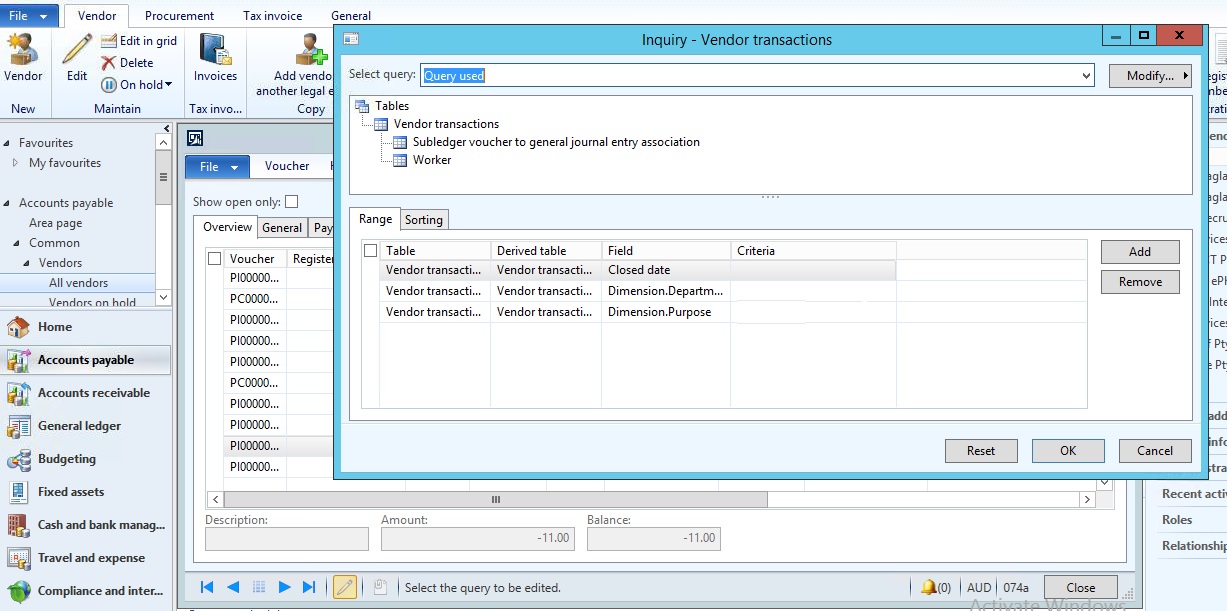
Filter by financial dimensions in AX 2012

Filter by financial dimensions in AX 2012

In this article, I'm going to show you how we can filet any form which has Financial as dimension. Like for instance on Items, Inventory transactions, Customers, Sales forecasts.

It was very easy in AX 2009 where we could add financial dimension to over view tab and get the filters work. Ware as in AX 2012 with advanced financial dimension structure it is not possible, but there are ways to do it.

One of the best way is to use out of box features.
 i.e Advanced Filet option File--> Edit--> Filter--> Advanced filter/sort where we can see the filter criteria like Dimensions.CostCentre, Dimensions.Department, Dimensions.XXX.

Lets do a demo on Vend trans, so I want to apply filter on VendTrans based on Dimension Department and Purpose.
To do this Go to
1. Accounts payable/Common/Vendors/All vendors
2. Select a vendor and click on Transaction.
3. Now go to File--> Edit--> Filter--> Advanced filter/sort 
4. Give the values for the filter and click ok.

This will work for all the forms where financial dimensions are used.


Tuesday, 3 October 2017

Setting "Print Management" through x++ AX 2012 R3

Some times, if you want to set the "Print Management" for many customer will be a tedious job. In that case you may use the below code and make your life easy. 
The code goes as below. 

///
/// Job to set the PrintManagement 
/// Mallik on 04/10/2017
///
static void  MK_Set_PrintManagement1(Args _args)
{
 
  PrintMgmtSettings             printMgtSettings;
  PrintMgmtDocInstance          printMgtDocInstance;
  SRSPrintDestinationSettings   printDestinationSettings;
  PrintMgmtReportFormat         PrintMgmtReportFormat;
  PrintMgmtDocumentType         PrintMgmtDocumentType;
  PrintMgmtDocInstanceType      PrintMgmtDocInstanceType;
  NoYes                         NoYes;
  SRSReportFileFormat           SRSReportFileFormat;
  SRSPrintMediumType            SRSPrintMediumType;
  str                                  EmailTo;
  CustTable                     lCustTable;
  LogisticsElectronicAddress    elecAddress;
  container                     record;
  int                               totalRecords;
  container                     printerSetting = conNull();
  try
  {
      while select lCustTable where lCustTable.AccountNum == 'C5002'
      {
          totalRecords = totalRecords + 1;
          select firstOnly elecAddress
            where elecAddress.Location == DirPartyLocation::findOrCreate(lCustTable.Party, 0).Location
            && elecAddress.Type == LogisticsElectronicAddressMethodType::Email; 
          if (elecAddress.RecId)
          {
              EmailTo                       =  elecAddress.Locator;
          }

          printDestinationSettings =   new SRSPrintDestinationSettings(printerSetting);
          printDestinationSettings.unpack(printerSetting);
          printDestinationSettings.caption("@SYS131685");
          printDestinationSettings.emailTo(EmailTo);
          printDestinationSettings.printMediumType(SRSPrintMediumType::BTDPA_Process);
          printDestinationSettings.emailSubject('Invoice');
          printDestinationSettings.emailAttachmentFileFormat(SRSReportFileFormat::PDF);
          printDestinationSettings.numberOfCopies(1);
          printMgtDocInstance=PrintMgmtDocInstance::find(lCustTable.RecId, lCustTable.TableId, PrintMgmtNodeType::CustTable,1 ,1);
          ttsBegin;
          
          if (printMgtDocInstance)
          {
              printMgtDocInstance.selectForUpdate(true);
          }
          printMgtDocInstance.Name           = "AutoDelivery";
          printMgtDocInstance.DocumentType   = 1;
          printMgtDocInstance.PrintType      = PrintMgmtDocInstanceType::Original;
          printMgtDocInstance.PriorityId     = 1;
          printMgtDocInstance.Suppress       = NoYes::No;
          printMgtDocInstance.ReferencedTableId  =  lCustTable.TableId;
          printMgtDocInstance.ReferencedRecId    =  lCustTable.RecId;
          printMgtDocInstance.NodeType           =  PrintMgmtNodeType::CustTable;
          
          if (printMgtDocInstance)
                  printMgtDocInstance.update();
          else
                  printMgtDocInstance.insert();
          select firstOnly printMgtSettings order by PriorityID where printMgtSettings.ParentId==printMgtDocInstance.RecId && printMgtSettings.PriorityID==1;
          if (printMgtSettings)
          {
              printMgtSettings.selectForUpdate(true);
          }
          printMgtSettings.ParentId           = printMgtDocInstance.RecId;
          printMgtSettings.ReportFormat       = PrintMgmtReportFormat::findByDescription(1,'SalesInvoice.Report').RecId;
          printMgtSettings.PrintJobSettings   = printDestinationSettings.pack();
          printMgtSettings.NumberOfCopies     = 1;
          printMgtSettings.PriorityId         = 1;
          if (printMgtSettings)
                  printMgtSettings.update();
          else
                  printMgtSettings.insert();
          ttsCommit;
          if(printMgtDocInstance && printMgtSettings)
          {
              info(strFmt("Total recoreds updated: %1",totalRecords));
          }
          else
          {
              error(strFmt("Total recoreds updated: %1",totalRecords));
          }
      }
  }
  catch(Exception::Error)
  {
      Throw(Exception::Error);
  }
  info(strFmt("Total Read Records = %1",totalRecords));
}


How to Get Trade Agreement Line Discount Percentage by Item and Date in D365FO Using X++

  In Microsoft Dynamics 365 Finance and Operations (D365FO), trade agreements are used to manage prices and discounts for customers, vendor...